
Design is Changed.
Yet another article claiming that designers are “doomed” because AI is replacing us? I’m not going to write that. From what I’ve experienced in my own workflow, AI has actually made me more confident in designing boldly. Like many designers, I started with Figma. It’s a powerful tool that helped me create a lot of great work. But as I grew more comfortable with technology, I realized there were things I couldn’t express in Figma, for example, scroll-based animations and deeper interactive experiences. That’s what led me to fall in love with Framer. It allowed me to design websites not as static screens, but as dynamic storytelling experiences.
I’ve always had the ability to think about interaction, motion, and storytelling we all do. The difference is access. The right tools allow us to communicate those ideas effectively. With AI, this opportunity has expanded even further. For example, if Framer doesn’t natively support WebGL or advanced 3D visuals, we can use AI to help bridge that gap. Instead of seeing this as “extra skills we shouldn’t need,” we can see it as creative leverage.
Whenever new tools emerge, we often feel uncomfortable because they seem outside our primary job. As designers, coding is not our core responsibility. So it’s fair to ask why should we learn to code with AI if that’s not traditionally our role? But our real responsibility as designers is to prototype ideas, communicate concepts clearly, and create better experiences. If new tools allow us to design smarter, more intuitive, more expressive, or more engaging experiences — why wouldn’t we use them?
Isn’t it worth learning a little more if it helps our beloved users?
Getting to Know My Tools
What I've struggled with most, and seen others struggle with too, is not knowing which tool to use when everything is happening at once. That's exactly why understanding the strengths and limitations of each tool matters so much.
I knew Figma couldn't handle scroll animation well, so I learned Framer. Once I had Framer down, I hit its WebGL ceiling, but it handled scroll animation perfectly and was easy to work with. So instead of searching for one tool that does everything, I just paired Framer with a dedicated WebGL or 3D tool. Realistically, no single tool is going to do everything at its best.
I've essentially been tracking two values for every tool I use: what it's great at, and where it breaks down. Jitter, for example, is fast and does Lottie animation really well, but it can't animate text values. That's what pushed me toward Rive, which had a steeper setup but handled it well and integrated cleanly. I'll pick up a new tool over dropping a good design idea any day.
A Three.js Animation Built with Claude, OpenAI, and Framer
Now that you know how I think about tools, let me walk you through how I actually use them together without letting any one of them know I'm cheating.
I was recently building a website that needed to communicate four elements of a service. Rather than treating each one as a separate section, I saw overlap between them and wanted the design to reflect that. Framer's scroll animation was the answer: one component, four variants, smooth transitions as you scroll through each.
The catch was the website's theme: complex computing networks, AI workflows, smart technology. Flat 2D illustration wasn't going to do that justice. I kept coming back to Digital Saints Studio as a reference point. They do something really effective where a 3D object transforms, mostly rotates, as you move section by section, letting the object itself carry the narrative. That was exactly the kind of storytelling I was after.
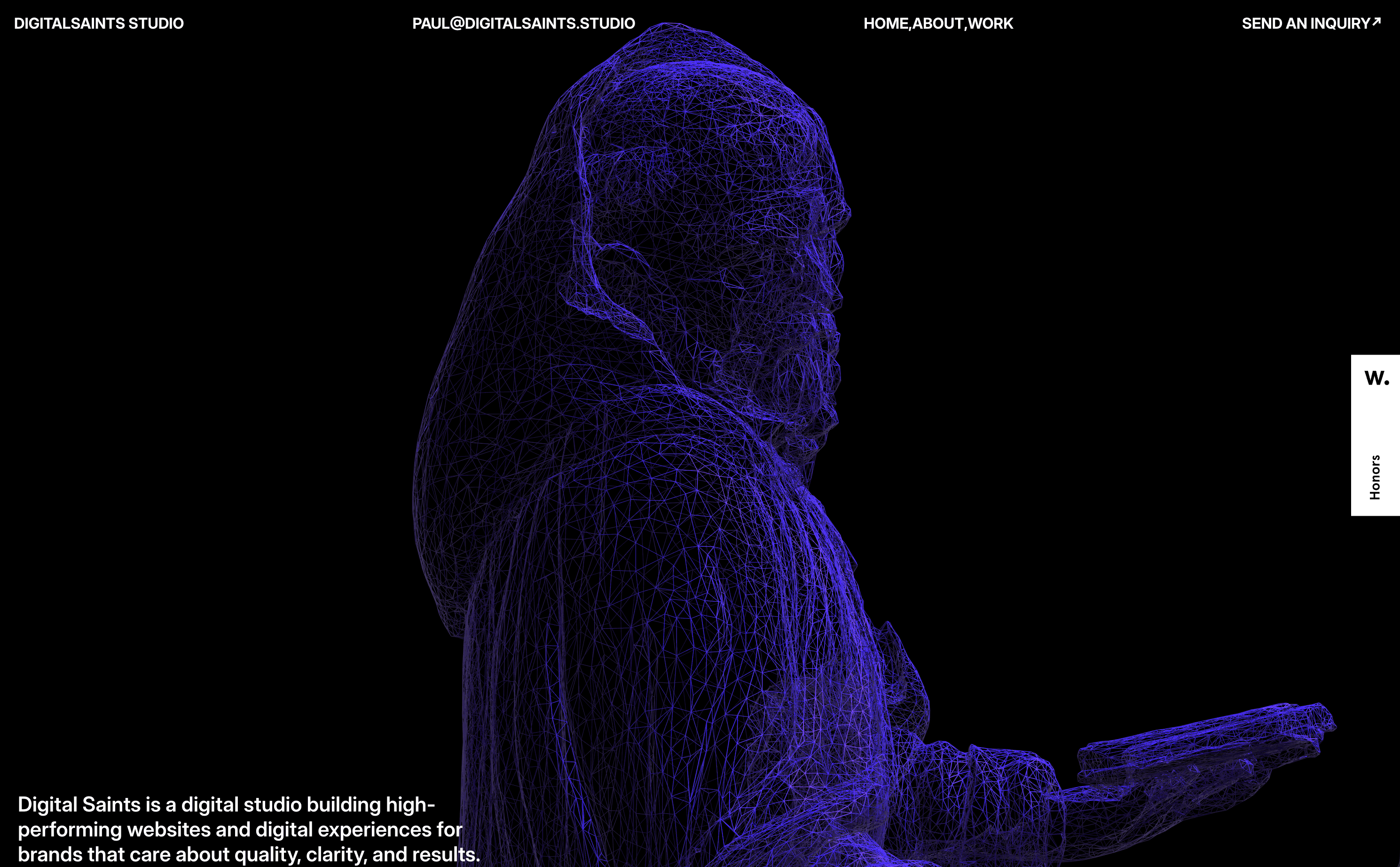
The past version of me wouldn't have dared to even attempt something like this. I'd have looked for workarounds that got the job done but stayed well within my comfort zone. But with the right tools, I knew it was possible.
I started with Claude, sharing my reference and describing what I wanted. I told it I needed smooth transitions across each "state" (I used that word intentionally, without letting it know I actually meant Framer variants 😉). It gave me a solid output on the first try, which was lucky because it usually takes two or three rounds.
Next, I asked it to transform the component into a proper Framer component where each state maps to a variant, controlled through Framer property controls. From there, I made my own tweaks to the animations, size, shape, and color to get it exactly right.
That's where knowing your tools' limitations matters. I knew if I asked Claude to design the full website, it would drift from my theme. I'd have to feed it the entire design system, and it still wouldn't nail the scroll transitions and the design the way I would in Framer natively. So I took the component into Framer and had the site structure ready in about 30 minutes.
Then Claude hit a wall. It couldn't cleanly convert the 3D component into a working Framer component, and debugging it wasn't going anywhere. So I brought in another tool: ChatGPT. It spotted the issue immediately. I've consistently had better luck with GPT for code debugging, so that's where I lean. Within an hour, the section was live.
demo: https://3dparticleobj.framer.website/
Creativity is Our Power Not Tools
This isn't a Framer or Claude tutorial, sorry if that's what you were expecting, and I'm happy to get into the implementation details if you're curious (DM). But the point I wanted to make is simpler: two years ago I wouldn't have dared build something like this, even with the ideas sitting right there. The tools I knew were the bottleneck. Today I can, not because the tools are magic, but because I've spent enough time with them to know what they can do, what they can't, and where they bend.
But here's the thing what makes this animation work has nothing to do with Claude or Framer. Maybe they're not even the best tools for this (they just work well for me). What makes it work is that it actually says something. It carries the message the site was built to deliver, which I haven't shared here.
In an industry obsessed with making things look impressive, it's easy to lose the thread. The tools are just tools. The real job is still the same one it's always been: understand what people want, and make the experience worthy of it. Do that well, and it almost doesn't matter what you used to get there.
Thanks For Reading 🙌
Other Blogs
Design Systems in The Age of AI
Thanks to Lazy Developers, Design Finally Got Smart

Designing Beyond the Screen